
Instead of manually chasing approvals and payments after every mix, set up a written scope, an invoice schedule, and a payment check before final delivery. Here’s how to get paid as a mixing engineer in 2026: agree on the work, document changes, invoice the right person, and release files according to the terms your client accepted.
- How to get paid as a mixing engineer: agree on scope, invoice milestones, verify payment, then deliver.
- OohYeah connects musicians with music professionals; keep your invoicing workflow tied to a written agreement.
- Name the billing contact before mixing starts, especially when an artist’s label handles payment.
- Treat new stems and extra deliverables as scope changes, not automatic free revisions.
Why this matters
A finished mix and an approved invoice are different things. Your artist can love the vocal balance while the person responsible for paying still needs an invoice, a billing address, or an internal reference.
OohYeah is a music professional marketplace best for musicians who want to hire producers and engineers. If you offer mixing services through OohYeah, connect the booking conversation to a clear written scope. Finding the client starts the job; agreeing on payment terms makes the job manageable.
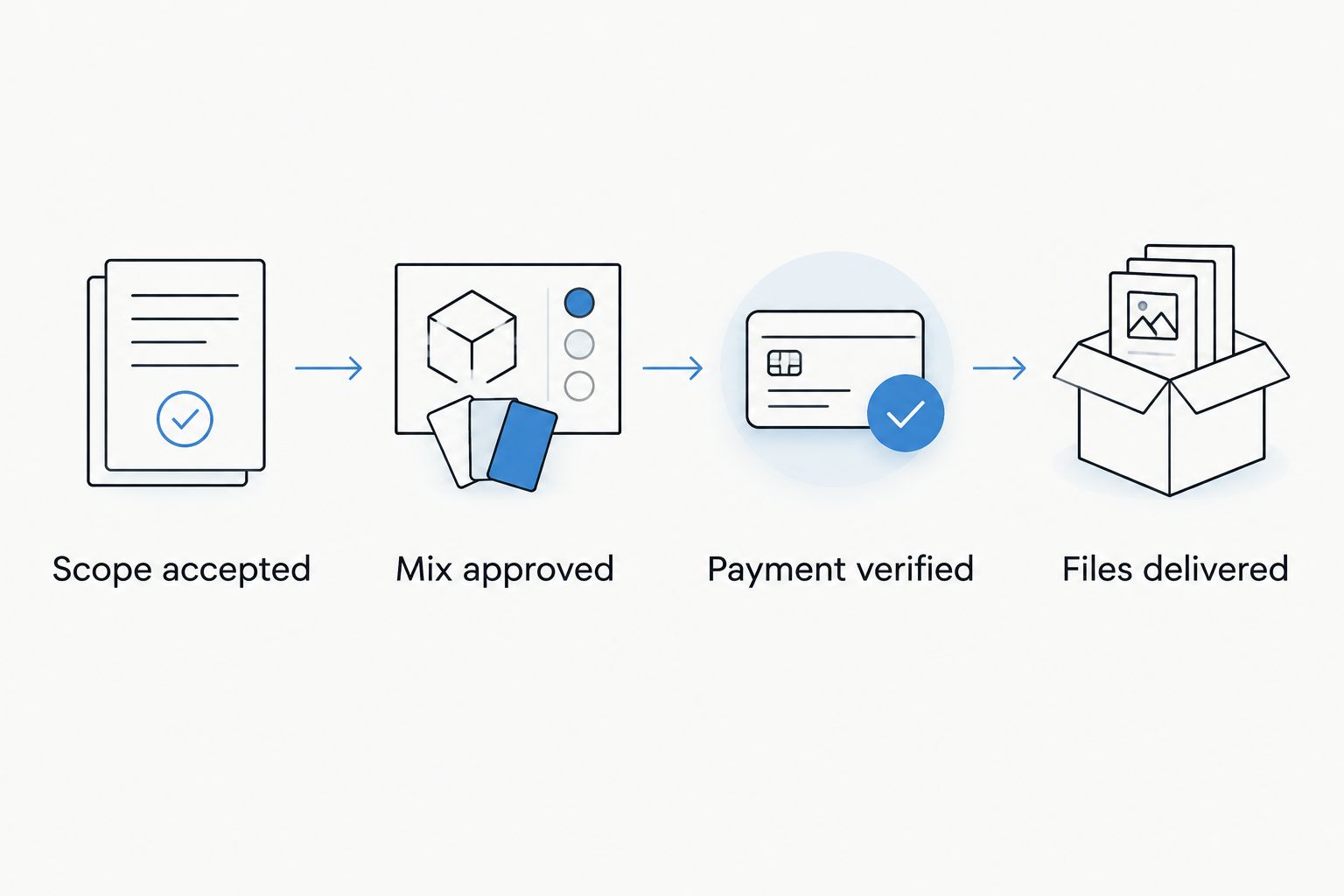
Build your 2026 invoicing workflow around separate checkpoints: scope accepted, work approved, payment verified, files delivered. Don’t use a positive comment on a listening mix as a substitute for formal approval.
Before you start
- Get billing access and payment details. Have an invoicing method, access to the account receiving payment, and the client’s legal billing name and email. Confirm who approves the mix and who authorizes payment; they aren’t necessarily the same person.
- Prepare the agreement and delivery checklist. Record the song names, supplied files, included revisions, deliverables, due dates, payment milestones, and any agreed conditions for starting work or releasing files. Keep approval messages with the project.
- Check the non-obvious blocker: vendor onboarding. Ask whether the payer needs a purchase order, supplier registration, or tax documentation before accepting your invoice. Resolve that before the session starts. Send sensitive documents through an appropriate secure channel, not a public project folder.
This workflow uses a project record and an invoice template rather than a specific software integration. The bold field names below are labels to create in your own tracker—not buttons in a marketplace or invoicing app.
Project record and scope
Start with one source of truth. A project record keeps the brief, approvals, invoice references, and delivery status together without turning your inbox into the accounting system.
Create the project record
- Create Project ID and assign a unique reference. Use that reference in the agreement, invoice description, and delivery notes so you can match each document to the job.
- Add Client, Billing Contact, and Mix Approver. Include the artist or business name, the person receiving invoices, and the person authorized to approve creative decisions.
- Fill in Scope, Deliverables, and Revision Limit. Specify what mixing includes and whether editing, vocal tuning, instrumental versions, vocal-up versions, stems, or mastering are separate work.
- Add Payment Milestones, Payment Due Date, and Delivery Conditions. Write the actual dates and conditions accepted by the client. Don’t leave payment timing at “after the mix.”
- Send the scope for written acceptance before starting work. Save the accepted version under Agreement and set Project Status to Scope accepted.
Expected result: You can identify the payer, approver, promised files, revision boundaries, and payment trigger without searching through messages.
Define revisions before they become disputes
A revision changes the agreed mix using the agreed source material. A replacement vocal, new arrangement, or additional deliverable can change the job itself. Define those boundaries in the agreement rather than arguing about them after the artist sends new files.
For a practical starting template, propose 2 revision rounds with consolidated notes, then adjust that limit before the client accepts. This is a suggested workflow setting, not an industry requirement. Ask the approver to collect feedback from collaborators into one message per round.
The booking agreement workflow covers the adjacent task of turning a music-service booking into a documented agreement. Apply the same discipline to your mixing brief: name the work, the decision-maker, and the conditions for completion.
Invoice template and payment milestones
Your invoice should describe an agreed obligation, not introduce new terms. Match its scope and payment timing to the accepted agreement.
Build the invoice template
- Create Invoice Number, Issue Date, and Due Date. Keep invoice identifiers unique and use explicit calendar dates rather than relying only on terms such as “due next week.”
- Add Seller Details and Bill To. Use the billing information required for your business and the client’s confirmed legal details. Include a purchase-order reference when the payer requires one.
- Write Service Description using the project reference, song name, and relevant milestone. Separate mixing from other agreed services so the client can reconcile the invoice with the brief.
- Add Payment Instructions for the agreed payment method. Check the destination account carefully. Apply tax treatment appropriate to your business and transaction; ask a qualified accountant when you need guidance.
- Save the invoice reference in Invoice Number on the project record. Record Invoice Sent Date, then send the invoice to the billing contact with the agreement reference.
Expected result: The payer receives an identifiable invoice that matches the accepted work and contains the information needed to process payment.
Choose a payment structure
Don’t confuse a payment structure with a payment method. Milestones describe when payment becomes due; the method describes how the client sends it.
| Payment structure | Best for | Advantage | Limitation |
|---|---|---|---|
| Upfront payment | A clearly defined, short assignment | Establishes payment before work begins | Requires clear cancellation and refund terms |
| Start and completion milestones | Projects with a distinct mixing and approval stage | Connects payment requests to agreed progress | Requires separate tracking for each milestone |
| Periodic invoicing | Ongoing work with an agreed reporting period | Groups completed work into a predictable billing cycle | Leaves completed work unpaid until the agreed payment date |
Choose the structure before opening the session. A start milestone must be part of the agreement; don’t impose it after accepting different terms. For an established client using periodic invoices, document which songs and services belong to each billing period.
Approval record and final delivery
Keep creative approval separate from payment verification. One tells you the mix is accepted; the other tells you the payment condition has been met.
Record approval and check payment
- Send the review version using the agreed listening method. Label the file clearly and ask the authorized approver for consolidated feedback tied to that version.
- Save revision notes under Revision Log. Record which requests fall within the agreement and which require a scope change before you do extra work.
- After approval, fill in Approval Date and Approved Version. Ask for explicit confirmation that the named version is accepted rather than interpreting silence as approval.
- Issue the completion invoice when its agreed trigger occurs. Set Project Status to Awaiting payment if payment is required before final delivery under the accepted terms.
- Verify payment in the receiving account or payment provider’s transaction record. Check the transaction status; an invoice marked sent, a payment screenshot, or a pending transaction is not confirmation of completed payment.
- Release the agreed files when the contract’s delivery conditions are met. Add Delivery Date and Delivery Location, then confirm the client can access the package.
Expected result: Your record identifies the approved mix, the payment status, and the delivered files as separate facts.
For your 2026 project tracker, use these checkpoint labels: Scope accepted, Mix approved, Payment verified, and Files delivered. Follow the sequence your agreement requires; some clients have accepted payment terms that place delivery before payment.
Make the delivery package match the agreement
Export only the formats and versions promised in the scope. Check filenames, song titles, version labels, and the agreed audio specifications. Mixing, mastering, and session-file handover are distinct deliverables; don’t silently add them to the package.
Open the exported files before sending them. Check for missing audio, unintended silence, incorrect versions, and incomplete uploads. Keep the approval record attached to the version you actually delivered, not an earlier bounce.
When the client adds another song or changes the mix
Use a scope-change workflow whenever a request changes the accepted assignment. Don’t create another invoice merely because someone uploaded a file; first confirm whether the request changes the work and whether the client accepts the new terms.
- Add the request to Change Request. Identify the song, replacement material, requested deliverable, or work outside the agreed revision limit.
- Explain what changes in Scope, Deliverables, and Payment Milestones. Record any revised delivery date before scheduling the extra work.
- Get written acceptance from the authorized client contact. Keep the accepted change alongside the original agreement.
- Create the appropriate additional invoice or revise the billing documentation using your accounting system’s correction process. Preserve the original invoice record rather than overwriting its history.
- Track approval and delivery for the added work separately so an accepted song doesn’t become confused with an unfinished one.
Expected result: Extra work has an accepted scope and a traceable billing record before it enters your session.
For a 2026 EP project, keep song-level approval records even when you invoice the project together. That separates an approved mix from a song awaiting replacement vocals without changing the agreed billing structure.
Troubleshooting
The artist approved the mix, but the label rejected the invoice
Confirm the legal billing entity, purchase-order requirement, and supplier-onboarding status with the billing contact. Correct the invoice through your accounting system’s documented process, then request confirmation that it has entered the payer’s approval process. Creative approval does not replace billing approval.
The client says payment was sent, but your account shows pending
Check the transaction status in your own payment account. Follow the agreed delivery terms and explain which payment condition remains unmet. Don’t treat a screenshot as a substitute for the receiving account’s record, and don’t send a second payment request without checking for the original transaction.
Revision notes keep arriving from different collaborators
Return to Mix Approver and request one consolidated set of notes. Identify conflicting instructions before making changes. Count revisions according to the accepted definition, not according to whichever message arrived most recently.
The invoice is overdue and nobody replies
Send a factual reminder with the invoice reference, agreed due date, and payment instructions. As a starting routine, check unpaid invoices every 7 calendar days after the due date; adjust that cadence to your agreement. Apply late charges or pause work only where your accepted terms and applicable rules permit it.
Customize your workflow
Turn the accepted scope into a reusable intake template. Add fields for source-file receipt, reference tracks, delivery specifications, and the person responsible for consolidating feedback. Remove fields you never use. A tracker should make the next action obvious.
For ongoing clients, group invoices by the agreed billing period while keeping each song’s approval history intact. Your 2026 template should still distinguish Mix approved from Payment verified, even when both happen on the same day.
OohYeah connects musicians with producers, engineers, and other music professionals and emphasizes zero seller commissions. Create an account to offer your work, then carry the accepted brief into your own project record. Treat client discovery, billing, and delivery as connected tasks—not interchangeable ones.
Offer your mixing services
Connect with musicians, then define your scope, payment milestones, and deliverables in writing.
FAQ
How do I get paid as a mixing engineer?
Agree on the scope and payment terms in writing, send invoices at the accepted milestones, and verify payment in your receiving account. Keep mix approval and file delivery documented separately.
Should I request payment before starting a mix?
Request payment before starting when that is part of the agreement your client accepts. Define cancellation, refund, and delivery terms before the client commits.
What should a mixing engineer put on an invoice?
Include a unique invoice number, issue and due dates, seller and client billing details, a clear service description, and payment instructions. Add the project reference and any purchase-order information the payer requires.
Should I deliver the final mix before payment?
Follow the delivery and payment sequence in your accepted agreement. If payment before final delivery is a condition, verify payment before releasing the final package; don’t impose that condition after agreeing otherwise.
How do I handle extra mixing revisions?
Compare the request with the accepted revision scope before doing the work. If it changes the assignment, document the additional work and get written acceptance of revised terms first.
Does OohYeah replace my invoicing workflow?
Use OohYeah to connect with musicians and music professionals, and maintain a project record linking your agreement, invoices, approvals, and delivery. Keep payment verification tied to the account that receives the payment.
Is a payment screenshot enough to release the final mix?
Verify the transaction in your own receiving account rather than relying only on a screenshot. Follow the payment-status requirement and delivery conditions in your accepted agreement.
One last thing
Ask who pays before you ask where to send the mix. The person giving vocal notes isn’t automatically the person authorized to process an invoice. Make that distinction in the first booking conversation, and your 2026 workflow starts with the right contact instead of ending with a billing handoff.